Help English Learners While You Teach or Preach.
Looking for VerbFlow.com? Click here.
Make your lessons accessible to all.
Show that you care.
The Prologo web page is a lesson plan/sermon notes editor. As the speaker progresses through the lesson, pressing the right arrow key or clicking the "next" button will:
- send quotations and difficult vocabulary to the cellphones of audience members who are trying to improve their command of conversational English,
- (optionally) send images to the room projector
- display a QR code on the room projector or on the speaker's device that lets students join the meeting on their cellphones.
Some members of your audience may even want to tune their cellphones into the chat and choose a language they studied in school.
Go to Lesson Plan Editor →Teachers of Any Subject

It is quite common to have students in your classes that have some difficulty with English. Show them that you care about their struggles and embed hotspots in you lecture notes that will go to their cellphones.
Go to Lesson Plan Editor →Teachers of Conversational English

Teaching conversational English pushes learners into areas they've never experienced before. With this aid you can easilly arm them with new vocabulary so that they can talk intelligently about a topic of interest to the class.
Go to Lesson Plan Editor →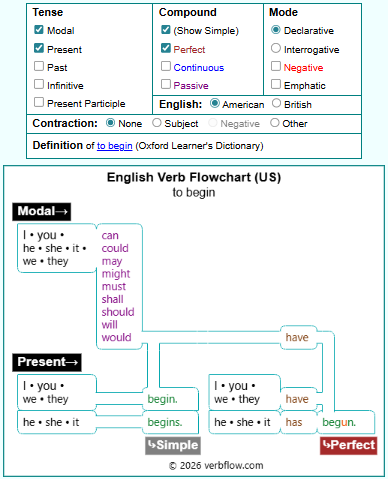
You really need to explore an area where many learners have trouble: the English compound verb tenses.
You can demonstrate any English verb from the simple tenses up up through each of the compound tenses. Additionally you can show the negative and contractions.
Go to Verb Flow Charts →Pastors and Public Speakers

Just imagine what this platform can do for you if prospective attendees know that you have made special accommodations for people still grappling with English.
You can control the projection screen from you speaker's notes. You can project a QR code that links them to the presentation. You can anticipate quotations and terminology they might struggle with.
Go to Lesson Plan Editor →
Discussion Groups

We recommend using Bible passages as the basis for upper-level conversational English lessons. The Bible is a great resource because it contains rich stories and teachings relevant to everyday life.
The Bible makes an unmatched shared resource for speakers from diverse cultures to engage in lively, meaningful conversation. We recommend using the Contemporary English Version (CEV) because it is written in simple, conversational English. It is available online for free at Bible Gateway.
Go to Lesson Plan Editor →